What is FNF vs Scary Larry from Roblox?
FNF vs Scary Larry from Roblox is a suspenseful mod that gives Boyfriend just one chance to battle Scary Larry from Roblox, merging the rap-battle mechanics of FNF with the unsettling humor of that beloved Roblox character. With this setup, it becomes an entirely new and tough experience. It consists of three quick-but-hard songs: "Scary," "Larry," and "Extremely Angry," each ensuring maximum demand on your rhythm and reflexes.
How to Play
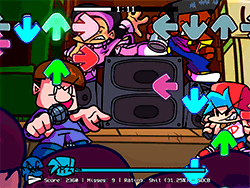
FNF vs Scary Larry is straight to play once you know how original FNF is played. Using your keyboard, you'll hit notes that appear on the screen following along with the music. The goal is to hit the lines in time with each key and rack up points. Too many misses and the song cuts short; there goes the game. The mod is about nail-biting precision moments worthy of each practice session!
Tips & Tricks
- Ghost Tapping Setting Off: For a hardcore challenge, turn off Ghost Tapping from settings! It prevents auto-hitting of notes, which will force you to drudge up every hit willingly.
- Google Chrome: For performance issues, the mod is recommended to be played on Google Chrome. This browser treats FNF mods with smooth respect rather than the others.
- Practice: Just like every rhythm game, it's practice. Begin with easier songs and work up to the more challenging ones.
History
FNF vs Scary Larry belongs to Roblox modding culture that sees creators take the base game and put their own spin on it. Two cherished worlds joined together to create one seamless gaming experience by the mod, which is a testimony to how much creative energy and passion are in the Roblox community.
Play Unblocked
Though FNF vs Scary Larry is supposed to be played on a desktop PC, there are some ways you can play on any device like Chromebooks, Macs, or Linux systems. Basically, the FNF was ported to web, making the game accessible to more players with their ability to enjoy the mod no matter whether their hardware shackles them.
Game Developer
FNF has been made by ninja_muffin99, with PhantomArcade3k and evilsk8r making contributions to the art version and kawaisprite composing the music. The mod itself was created by a talented team of developers and artists - include Clowfoe, Ziffyclumper, Julio, Sulayre, Grandma, Orbyy, keoni2440, CelShader, humbaynoob, and Binounoliky.
Game Platform
FNF vs Scary Larry is predominantly designed for high-end desktop PCs, but the web-optimized release to be made accessible over multiple platforms and vernaculars, including Chromebooks, Mac, Linux, and many more. This ensures everybody across wider spaces can entertain themselves with this mod without requiring a powerful PC.
How to Play Unblocked
To play FNF vs Scary Larry unblocked, you will have to find a good browser supporting this game. For best performance, recommended is Google Chrome. Just simply search the mod on a trusted gaming website, and it should start working smoothly on your browser without any restrictions.
FAQ
Q: Can I play this mod on my mobile device?
A: The mod was made for desktop PCs, but its web-optimized version is playable on some mobile devices given a compatible browser.
Q: Are the original FNF credits still included in this mod?
A: Yes, the mod credits acknowledge the original FNF developers and artists: ninja_muffin99, PhantomArcade3k, evilsk8r, and kawaisprite.
Q: How can I support the mod creators?
A: If you like the mod, then support the creators by following them on social media, subscribing to their channels, giving thumbs up on their posts, etc.
Q: What are the three songs in the mod?
A: The mod is composed of three songs: "Scary," "Larry," and "Extremely Angry."
Q: Do I need to disable Ghost Tapping for a challenge?
A: Indeed, disabling Ghost Tapping will make the game seriously fun and challenging.
Play FNF Vs Scary Larry From Roblox on your Mobile

Span the QR Code with your mobile device camera to play FNF Vs Scary Larry From Roblox
You can enjoy this game on mobile and tablet(such as iPhone, IPad, and Android device)
 FNFunKin