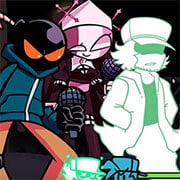
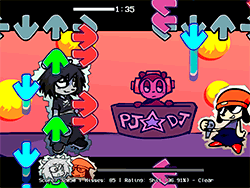
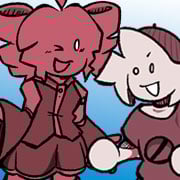
What Is FNF Vs Grunt Gaming 2.0?
FNF Vs Grunt Gaming 2.0 is an entertaining and dynamic mod for the beloved rhythm title Friday Night Funkin. The Boyfriend character, in this unique twist, suddenly shows up in the middle of a gaming session at Grunt Gaming's place, leading to a hilarious and high-energy rap battle to expel him. The 2.0 update brings an all-new Week 2 while preserving the frantic pace and fun gameplay that the fans adore. For seasoned FNF players or those fresh to the series, this mod brings a different challenge with catchy songs and a gripping storyline.
How to Play
Playing FNF vs Grunt Gaming 2.0 would be very simple if you knew how to play the original Friday Night Funkin; you basically have to tap, drag, and flick notes depending on the rhythm of the song. The objective is to hit all the notes correctly; the more you miss, the lower your score becomes. The good thing about the game is that it is designed to be intuitive, but the gameplay and the songs are difficult enough to hold you by your seat.
Tips & Tricks
- Practice timing: The key to success lies in practising your timing. Focus on the notes, and start hitting them as soon as they hit the hit area.
- Ghost Tapping: This is good if you want to get comfortable with the characters. If you want a challenge, though, turn Ghost Tapping off in settings. It just gets more interesting.
- Use the right browser: For the best experience in playing the FNF Mod, use Google Chrome so you can enjoy smoother gameplay and overall better experience.
The History Behind
The mod community since Friday Night Funkin has been thriving, and FNF vs Grunt Gaming 2.0 is an example of such creativity. The mod was created by ReimLite, handling programming, sprite work, and music on his own. NLeeBoy, owner of Grunt Gaming, collaborated as an owner, while mmmaple did some coding, and SenZyinthehouse and Madnyana helped with assets and cutscenes. The original FNF credits go to ninja_muffin99 for programming, PhantomArcade3k and evilsk8r for the art, and kawaisprite for the music. The modbed aim is to help FNF and its variants reach a much wider audience, including those not being able to run the traditional EXE files on their systems.
Play Unblocked
When the game is blocked at school or work, the way to play the FNF vs Grunt Gaming 2.0 is to unblock it. Keeping a web-optimized version of the game ensures it is smooth running on most devices, including Chromebooks, Macs, and Linux systems. Visiting the game's webpage should be enough to play freeerees.
Game Developer
FNF vs Grunt Gaming 2.0, developed primarily by ReimLite, was crafted with the fun experience in mind, keeping everybody entertained for long hours. NLeeBoy, mmmaple, SenZyinthehouse, and Madnyana are the ones also contributing with their various skills.
Game Platforms
FNF vs Grunt Gaming 2.0 intended to get everybody playing no matter what platforms they use. So high-end desktop PCs, Chromebooks, Macs, Linux-based operating systems, and others are all great to run the game. Being web-optimized, the port version of this game assures you smooth running on various platforms, so everyone gets to enjoy it.
How to Play Unblocked
Below are steps you can follow to play FNF vs Grunt Gaming 2.0 unblocked:
- Use a Web- Make sure you have access to the game through a web-optimized port functioning smoothly on all kinds of devices.
- Google Chrome: For excellent performance, use Google Chrome. It helps smooth out drama and discrepancies you may make during gameplay.
- Avoid EXE Files: Should you face hinder in functioning, try hitting the web version rather than EXE files download as they may clash with your device.
FAQ
Q: What is Ghost Tapping?
A: Ghost Tapping is a feature in Friday Night Funkin that allows you to see a ghost image of the notes, making it easier to hit them. Turning it off adds an extra challenge.
Q: Which browser is best for playing the game?
A: Google Chrome is recommended for the best performance and smooth gameplay.
Q: Can I play the game on my Chromebook?
A: Yes, the web-optimized version of FNF vs Grunt Gaming 2.0 is designed to work on Chromebooks, Macs, Linux systems, and more.
Q: How can I support the mod creators?
A: If you enjoy the game, you can support the mod creators by subscribing to their YouTube channel, following them on social media, liking their videos, and spreading the word to other players.
Jam to the beats of the rhythm and just have fun! FNF vs Grunt Gaming 2.0 is a must-play for any fan of Friday Night Funkin or anyone looking for a fun and challenging rhythm game.
Play FNF Vs Grunt Gaming 2.0 on your Mobile

Span the QR Code with your mobile device camera to play FNF Vs Grunt Gaming 2.0
You can enjoy this game on mobile and tablet(such as iPhone, IPad, and Android device)
 FNFunKin



![Play FNF Tankman Week 7 [HD] Now](https://img.crazygames-poki.com/afafe20b174171344c8324b1b7acba27.jpeg)









![FNF vs Hex Mod [Full Week] Play FNF vs Hex Mod [Full Week] Now](https://img.crazygames-poki.com/423af2bb94865d99a1fb716e96f9ec21.jpeg)





![Play FNF Weekend 1 [Girlfriend Mix] Now](https://img.crazygames-poki.com/25717c87ab7ee7c90f3da0a3c222e158.jpg)