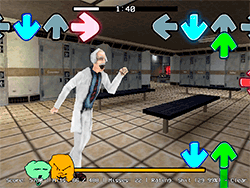
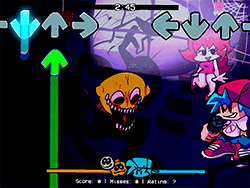
What is FNF VS Sonic.EXE Cereal Killer?
FNF VS Sonic.EXE Cereal Killer is a thrilling mod of Friday Night Funkin' and rhythm-based, with the grungy style of FNF being maintained in this new rendition. In this one, Sunky plays the Boyfriend role, battling rap against opponents, old and new. The mod comes with fresh tunes and a cool gameplay style, making it a must-play for any FNF player looking for newer challenges.
How to Play
Playing on FNF VS Sonic.EXE Cereal Killer is mainly about hitting the right key at the right time, accents must be maintained. Note arrows will move up to the interface; they will have to be hit using the keys within the keyboard in time of the music. Your ability to hit all notes will determine your successes in defeating the rival. The game contains a mixture of songs, with styles and difficulty ratings all varying with each song.
Tips & Tricks
- Practice Makes Perfect: Spend time practising each song and get accustomed to hit those notes.
- Turn Off Ghost Tapping: Increase the difficulty by turning Ghost Tapping off in Settings. This means that the game will not do any of your note-tapping for you; instead, you will have to do it yourself.
- Use the Right Browser: To get the best performance, then use Google Chrome to play the mod.
History
This can be described as a mod development from a huge community that keeps FNF alive and kicking. The origin of the FNF VS Sonic.EXE Cereal Killer module lies with a few talented contributors; thus, each person had a particular skill to contribute, such as sprite artists or musicians. The whole process describes the heartfelt development behind FNF.
Play Unblocked
Although FNF VS Sonic.EXE Cereal Killer is largely made for PC, this software retains the online version for those who find it difficult to run .exe files. The web port created by KBHGAMES.com brings much more accessibility to the enjoyment of FNF and other mods for users of Chromebooks, Mac, and Linux. But remember that they might not have exactly the same mechanics and features as the PC version.
Game Developer
The original FNF was designed by ninja_muffin99, with phantomarcade3k and evilsk8r doing the art, and kawaisprite doing the music. This particular mod was done by a hand of gifted modders, with members including NotSoAdvanced, ScrubbDubb, The Senpai Expert, Sawsk, Scary_Tv_Man1, ?JDrive, Markthemaster91, MonkeMango, and P.R.
Game Platforms
Mod creation is targeted mainly at the PC platform; however, said web ports will be presented in a few more platforms: Chromebooks, Macs, and Linux systems. This will assure that the remaining member of the growth of the players can become gamers, unlike being partial to a choice of hardware.
How to Play Unblocked
To play FNF VS Sonic.EXE Cereal Killer unblocked, you can opt for the web version on platforms such as KBHGAMES.com. Just head to the site and get started. For the best experience, use Google Chrome and make sure to have a solid Internet connection.
FAQ
Q: Can I play this mod on my mobile device?
A: The mod is primarily designed for PC and web browsers. While there might be mobile versions available, the experience is best enjoyed on a larger screen.
Q: Are there different difficulty levels?
A: Each song in the mod has a set of difficulty levels, ranging from easy to hard. You can pick any song according to your ability.
Q: Is the web version free?
A: Yes, the web version of FNF VS Sonic.EXE Cereal Killer is free to play. However, some features might be limited compared to the PC version.
Play FNF VS Sonic.EXE Cereal Killer on your Mobile

Span the QR Code with your mobile device camera to play FNF VS Sonic.EXE Cereal Killer
You can enjoy this game on mobile and tablet(such as iPhone, IPad, and Android device)
 FNFunKin


















![FNF Tankman Week 7 [HD] Play FNF Tankman Week 7 [HD] Now](https://img.crazygames-poki.com/afafe20b174171344c8324b1b7acba27.jpeg)























![Play FNF Weekend 1 [Girlfriend Mix] Now](https://img.crazygames-poki.com/25717c87ab7ee7c90f3da0a3c222e158.jpg)